
Building restaurant websites can look simple from the outside. But once you start working with real clients, the process can become repetitive.
You need a suitable design, restaurant content, menus, photos, booking options, contact information, mobile-friendly pages, and a way to show the prospect what you can build before they agree to the project.
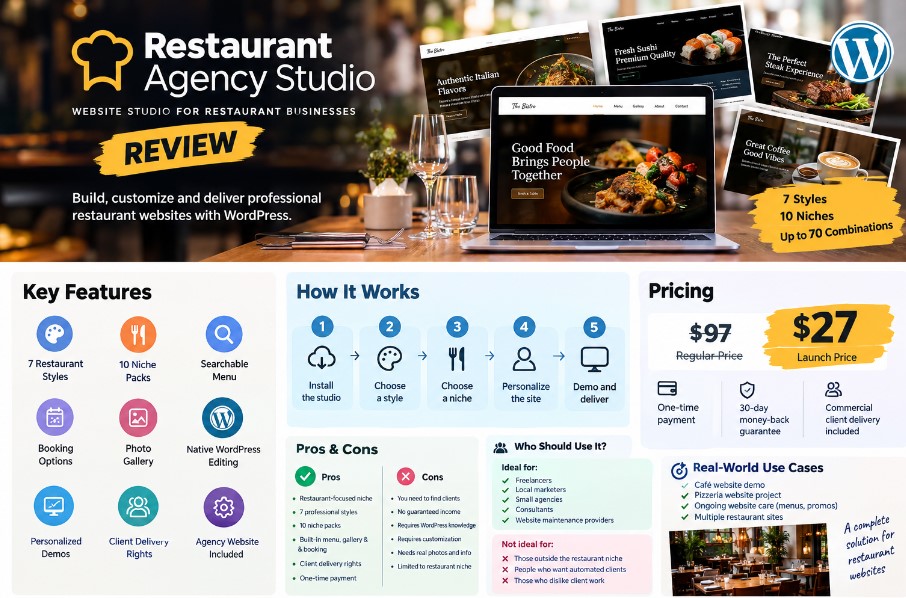
Restaurant Agency Studio takes a different approach. Instead of giving you just another WordPress theme, it is positioned as a restaurant-focused website creation and client-delivery system.
In this Restaurant Agency Studio review, I’ll explain what the product includes, how the workflow works, its pricing, strengths and weaknesses, who it is designed for, and how it compares with more general website-building options.
Review disclaimer: This review is primarily based on the official Restaurant Agency Studio sales-page information and publicly available information. I have not treated sales-page claims, revenue projections, or promotional examples as independently verified results.
Quick Summary
| Category | Details |
|---|---|
| Product | Restaurant Agency Studio |
| Platform | WordPress |
| Main purpose | Build, demonstrate, personalize, and deliver restaurant websites |
| Restaurant styles | 7 |
| Niche packs | 10 |
| Starting combinations | Up to 70 |
| Menu system | Searchable menu with categories and filters |
| Booking | Built-in booking form or external reservation link |
| Agency website | Included with 3 agency styles |
| Client delivery | Commercial client delivery rights |
| Payment model | One-time payment |
| Launch price shown | $27 |
| Regular price shown | $97 |
| Money-back guarantee | 30 days |
| Overall rating | 8.5/10 |
| Sales Page | Click Here |
Verdict
Restaurant Agency Studio is most interesting for freelancers, local marketers, WordPress designers, consultants, and small agencies that specifically want to sell websites to restaurants.
Its main advantage is the workflow rather than any single template. You can select a restaurant niche, choose a design, personalize a prospect demo, show it to the business owner, and then build the client’s finished site on a separate WordPress installation.
The main limitation is equally important: the product does not replace prospecting, sales, client communication, hosting, or normal WordPress work.
What Is Restaurant Agency Studio?
Restaurant Agency Studio is a WordPress-powered website creation and delivery system focused on restaurant businesses.
The idea is to make restaurant website projects more repeatable.
Instead of starting with a blank WordPress website every time, the system provides prepared restaurant designs, niche-specific content, menus, galleries, booking options, business settings, and personalized prospect demos.
The sales page currently lists seven restaurant website styles:
- Ivory Editorial
- Midnight Brass
- Terracotta Courtyard
- Golden Art Deco
- Peach Social
- Hearth & Heritage
- Bold Social Kitchen
It also includes 10 restaurant niche packs covering:
- American restaurants
- Italian restaurants
- Mexican restaurants
- Pizza and pizzerias
- Catering
- Coffee shops and cafés
- Burger restaurants
- Steakhouses
- Seafood restaurants
- Sushi restaurants
The seven styles can be combined with the 10 niche packs, creating up to 70 starting combinations. That does not mean 70 completely unique websites are generated automatically. Rather, they provide different starting points that you can personalize for individual clients.
This distinction is important.
Restaurant Agency Studio is better understood as a focused website production system than as an autonomous AI website builder.
Key Features
1. Seven Restaurant Website Styles
One of the most obvious features is the collection of seven restaurant-focused design systems.
The purpose is to avoid giving every client exactly the same visual presentation.
For example, a café could use a softer design direction, while a steakhouse might require something more sophisticated.
The sales page says each style can be paired with any of the included niche packs, giving agencies more starting combinations without rebuilding layouts from scratch.
2. Ten Complete Restaurant Niche Packs
The niche packs are designed to reduce the amount of content preparation required at the beginning of a project.
Instead of creating every restaurant page from an empty canvas, you can begin with content relevant to the type of business.
The included categories cover a reasonably focused restaurant market, from pizza and cafés to seafood and sushi.
You would still need to replace placeholder information with the client’s actual business details, menu, photographs, branding, and story.
3. Searchable Menu Builder
Restaurant menus are one of the more practical features here.
The system provides a structured menu rather than forcing visitors to view a static menu image or PDF.
According to the sales material, visitors can search dishes, browse categories, and identify featured or popular items.
For a restaurant website, this is a useful feature because the menu is often one of the first things potential customers want to see.
4. Restaurant Photo Gallery
Restaurants depend heavily on visual presentation.
Restaurant Agency Studio includes a dedicated gallery for food, interiors, events, catering, staff, and other imagery.
However, the agency still needs to replace sample imagery with the client’s real photos. The sales page specifically presents replacing sample images as part of the personalization process.
5. Booking Options
The system includes a practical booking approach.
You can use a built-in booking form with a daily capacity limit, or send visitors to an existing external reservation service.
The sales page gives OpenTable as an example of an external reservation link.
This is useful because not every restaurant needs the same reservation setup.
6. Central Business Settings
Restaurant information can be managed through centralized business settings.
The listed information includes:
- Restaurant name
- Logo
- Address
- Contact details
- Opening information
The benefit is simple: recurring business information can be kept organized instead of being manually searched for across different pages.
7. Native WordPress Editing
The system uses native WordPress blocks for customization rather than requiring a separate paid page builder.
The sales page says users can adjust colors, fonts, images, copy, logos, and page sections using familiar WordPress editing tools.
That could be particularly useful for freelancers who want to keep their WordPress stack relatively simple.
8. Personalized Prospect Demos
This is arguably the most interesting business feature.
Instead of showing a generic portfolio, you can prepare a demo around a particular restaurant prospect.
The workflow is:
Find a restaurant → add its business details → choose a design and niche → personalize the demo → show the owner → agree on the project → build the final site.
The sales page specifically describes separate WordPress installations for client websites, rather than putting every client’s finished website on the agency installation.
That makes the product more than a template collection.
It is attempting to organize the sales and delivery workflow around the website itself.
How It Works
Restaurant Agency Studio’s basic workflow can be simplified into six steps.
Step 1: Set Up Your Agency Website
You first install the system on WordPress and create the agency-side website.
The package includes three agency styles, a portfolio, and restaurant demos that can be used to present your website service.
Step 2: Choose a Restaurant Niche
Pick the type of business you want to approach.
For example:
- Pizza restaurant
- Café
- Steakhouse
- Sushi restaurant
Then select an appropriate website style.
Step 3: Personalize the Prospect Demo
Add the restaurant’s business information and branding.
The goal is to give the prospect something specific to look at rather than sending a generic portfolio.
Step 4: Present the Demo
Show the restaurant owner the proposed website direction.
This can make the conversation more concrete because the prospect can react to something visual.
Step 5: Build the Client Website
After the project is agreed upon, the client’s website is built on its own WordPress installation.
Step 6: Deliver and Maintain
Once the website is ready, you can continue offering services such as menu updates, promotions, maintenance, hosting, or local SEO.
The sales page positions these as potential extensions of the initial website service, not guaranteed income.
Pricing Plans Restaurant Agency Studio Review
Restaurant Agency Studio is presented as a one-time purchase, rather than a recurring SaaS subscription.
| Plan | Price / Details |
|---|---|
| Regular price | $97 |
| Launch price shown | $27 |
| Payment type | One-time |
| Commercial client delivery | Included |
| Money-back guarantee | 30 days |
| Support | Personal email support |
| Coupon shown on sales page | RESTAURANTSTUDIO for $2 off |
The supplied sales page lists the current launch price as $27 and the regular price as $97. It also states that commercial client delivery rights are included.
Important: promotional pricing can change, so the current checkout price and terms should always be checked before purchasing.
The sales material also mentions optional upgrades in connection with the product walkthrough, but the supplied information does not provide enough reliable detail for me to present specific upgrade prices or features as part of the core package.
Pros and Cons
Pros
- Focused restaurant niche rather than a generic website package
- 7 professional website styles
- 10 restaurant niche packs
- Up to 70 style-and-niche starting combinations
- Searchable restaurant menu
- Photo gallery
- Built-in booking option
- External reservation link support
- Central business settings
- Native WordPress block editing
- Personalized prospect demos
- Separate WordPress installation for each client
- Commercial client delivery rights
- One-time payment model
- 30-day money-back guarantee
- Agency website included
Cons
- You still have to find and contact restaurant prospects
- It does not guarantee clients or revenue
- You still need WordPress and hosting knowledge
- Client websites require personalization
- Real restaurant photography and business information must be supplied
- Advanced custom functionality may require additional tools or development
- The system is highly focused on restaurants, so it may have limited value if you serve unrelated industries
- Sales-page revenue examples should not be interpreted as typical earnings
That last point deserves attention.
The sales page includes revenue calculations and examples of published website-service prices. It explicitly states that those figures are illustrative gross revenue and not profit or guaranteed income.
Who Should Use This Tool?
Restaurant Agency Studio makes the most sense for people who want to build a restaurant website service.
Freelance Web Designers
If you already know WordPress but don’t want to create every restaurant project from a blank site, the prepared starting points could save setup time.
Local Marketers
If your main service is local SEO, marketing, or lead generation, restaurant websites could become an additional service.
Small Agencies
Agencies handling multiple restaurant clients may benefit from having a consistent production workflow.
Restaurant Consultants
Consultants could potentially add website, menu, and booking services to their existing client relationships.
Website Maintenance Providers
A website can also create opportunities for recurring menu updates, seasonal promotions, maintenance, and support.
Beginners
The product is designed around guided WordPress setup and does not require advanced coding according to the sales material.
However, beginners should still expect to learn basic WordPress, hosting, domains, editing, and client management.
Who Should Avoid It?
This probably isn’t the right product if:
- You have no interest in restaurant websites.
- You already have a highly customized WordPress development system.
- You need advanced custom-coded applications.
- You expect the tool to find clients automatically.
- You want guaranteed income.
- You want a completely hands-off business.
- You dislike dealing with clients and revisions.
The most important distinction is this:
Restaurant Agency Studio provides the production system. It does not provide the clients.
Performance & Real-World Use Cases
Because this review is based primarily on the sales-page material rather than an independent hands-on test, I would separate documented functionality from unverified performance claims.
The documented workflow makes sense for several practical scenarios.
Use Case 1: Creating a Demo for a Café
You could choose a café niche pack, select a suitable design, add the business name and details, then show the owner a personalized website concept.
Use Case 2: Selling a Website to a Pizzeria
A pizzeria can be given a restaurant-specific design with a searchable menu, gallery, contact information, and booking or reservation path.
Use Case 3: Offering Ongoing Website Care
After delivering the website, the agency could offer menu changes, seasonal promotions, hosting, maintenance, or local SEO.
Use Case 4: Building Multiple Restaurant Sites
The commercial license is designed for client delivery, and the sales page says users can build unlimited client websites with separate WordPress installations.
The important caveat is that none of these use cases automatically produces clients or revenue.
Your prospecting, sales ability, pricing, service quality, and client retention still matter.
Comparison With Popular Alternatives
Restaurant Agency Studio is not the only way to create restaurant websites.
Restaurant Agency Studio vs WordPress + Elementor
A traditional WordPress + Elementor setup gives you a much broader design ecosystem and extensive customization possibilities.
The downside is that you may need to assemble the restaurant-specific pieces yourself.
Restaurant Agency Studio takes the opposite approach: it narrows the focus to restaurants and packages designs, niche content, menus, galleries, booking, demos, and delivery into a specific workflow.
Best distinction: Elementor is a broad website-building approach; Restaurant Agency Studio is a niche-focused production system.
Restaurant Agency Studio vs Wix
Wix provides an all-in-one hosted website platform and has restaurant-oriented functionality.
That can be convenient for business owners who want a hosted solution without managing WordPress infrastructure.
Restaurant Agency Studio is more appropriate for someone who wants a WordPress-based client delivery workflow and commercial control over multiple client sites.
Restaurant Agency Studio vs Squarespace
Squarespace is another general-purpose website platform known for professionally designed templates and hosted website management.
Its strength is simplicity and a managed environment.
Restaurant Agency Studio is more narrowly designed around agencies creating and delivering restaurant websites through WordPress.
So the choice depends heavily on your business model.
If you want a simple hosted platform for individual businesses, a mainstream website builder may make more sense.
If you want a repeatable restaurant-focused WordPress workflow for client work, Restaurant Agency Studio has a more specific proposition.
My Honest Verdict & Final Rating
Restaurant Agency Studio is best understood as a restaurant website production and client-delivery system, not a magic AI business or automatic client-generation tool.
Its strongest idea is the combination of prepared website designs + niche content + restaurant functionality + personalized prospect demos + commercial client delivery.
The personalized demo workflow is particularly interesting because it connects website creation with the sales process.
Instead of saying, “I can build you a website,” you can potentially show the restaurant owner a starting point designed around their business.
The product also addresses several practical restaurant requirements, including menus, galleries, contact information, and booking options.
However, the limitations are important.
You still need to find prospects.
You still need to close sales.
You still need to customize websites.
You still need hosting, domains, client communication, revisions, and ongoing support.
And the revenue calculator shown on the sales page is an illustration, not evidence that a buyer will generate the same results.
Overall Rating: 8.5/10
| Category | Rating |
|---|---|
| Restaurant focus | 9/10 |
| Design variety | 8.5/10 |
| Features | 8.5/10 |
| Prospect demo workflow | 9/10 |
| Ease of use | 8/10 |
| Client delivery | 9/10 |
| Flexibility | 8/10 |
| Value at stated $27 launch price | 9/10 |
| Overall | 8.5/10 |
This rating is an editorial assessment of the documented feature set and stated use case, not a guarantee of performance or income.
FAQ
1. What is Restaurant Agency Studio?
Restaurant Agency Studio is a WordPress-powered system designed to help freelancers, marketers, consultants, and agencies create, demonstrate, customize, and deliver websites for restaurant businesses.
2. Is Restaurant Agency Studio an AI website builder?
The supplied material describes it as a WordPress-powered website creation and delivery studio. I would not describe it as a fully autonomous AI website builder based on the available information.
3. How many restaurant designs are included?
The current sales page lists 7 restaurant website styles: Ivory Editorial, Midnight Brass, Terracotta Courtyard, Golden Art Deco, Peach Social, Hearth & Heritage, and Bold Social Kitchen.
4. How many restaurant niches are included?
There are 10 niche packs, covering American, Italian, Mexican, pizza, catering, coffee and café, burger, steakhouse, seafood, and sushi businesses.
5. Can I use the websites for clients?
According to the sales-page information, commercial client delivery rights are included, and the product is presented as supporting unlimited client sites. Each client website uses its own WordPress installation.
6. Does Restaurant Agency Studio guarantee clients or income?
No. The sales page’s own revenue material states that its projections are illustrative and that actual pricing, sales volume, client retention, costs, and results vary. The system provides website-building and delivery tools; it does not guarantee customers or earnings.
Conclusion
Restaurant Agency Studio is a focused product for a specific business model: building and selling WordPress websites to restaurants.
It isn’t trying to replace every website builder or professional development platform.
Instead, its goal is to reduce repetitive work by bringing restaurant designs, niche content, menus, galleries, booking options, business settings, personalized demos, and client delivery into one workflow.
For someone who already wants to approach restaurant owners, that focus can be useful.
For someone who simply wants a generic website builder or expects software to generate clients automatically, the product is much less compelling.
At the $27 launch price shown on the supplied sales page, the entry cost is relatively low compared with the amount of restaurant-specific functionality being offered. But the real value depends on whether you actually use the system to build and sell websites.
The smartest way to evaluate it is therefore not to ask, “Will this make me money?”
A better question is:
“Do I have a realistic plan to approach restaurant businesses and use this system to deliver websites for them?”
If the answer is yes, Restaurant Agency Studio provides a focused starting point for that workflow.
Affiliate Disclosure
This article may contain affiliate links. If you purchase through one of the links on this page, I may earn a commission at no additional cost to you. This does not change the price you pay or the information presented in this review.